The fortieth firewall takes as long as the first.
Documents are built from doc types: an ordered set of typed fields. Values are keyed by field id, never by label, so a label can change without touching a single document. And when the template is missing something, you add it from where you are standing.
Company → Location → Document.
A doc type's scope decides where its documents live. A Domain or a Microsoft 365 tenant belongs to the company; a firewall, a circuit, or a printer belongs to a location. The company page lists its locations and its documents grouped by type, and the sidebar is nothing but your documentation.
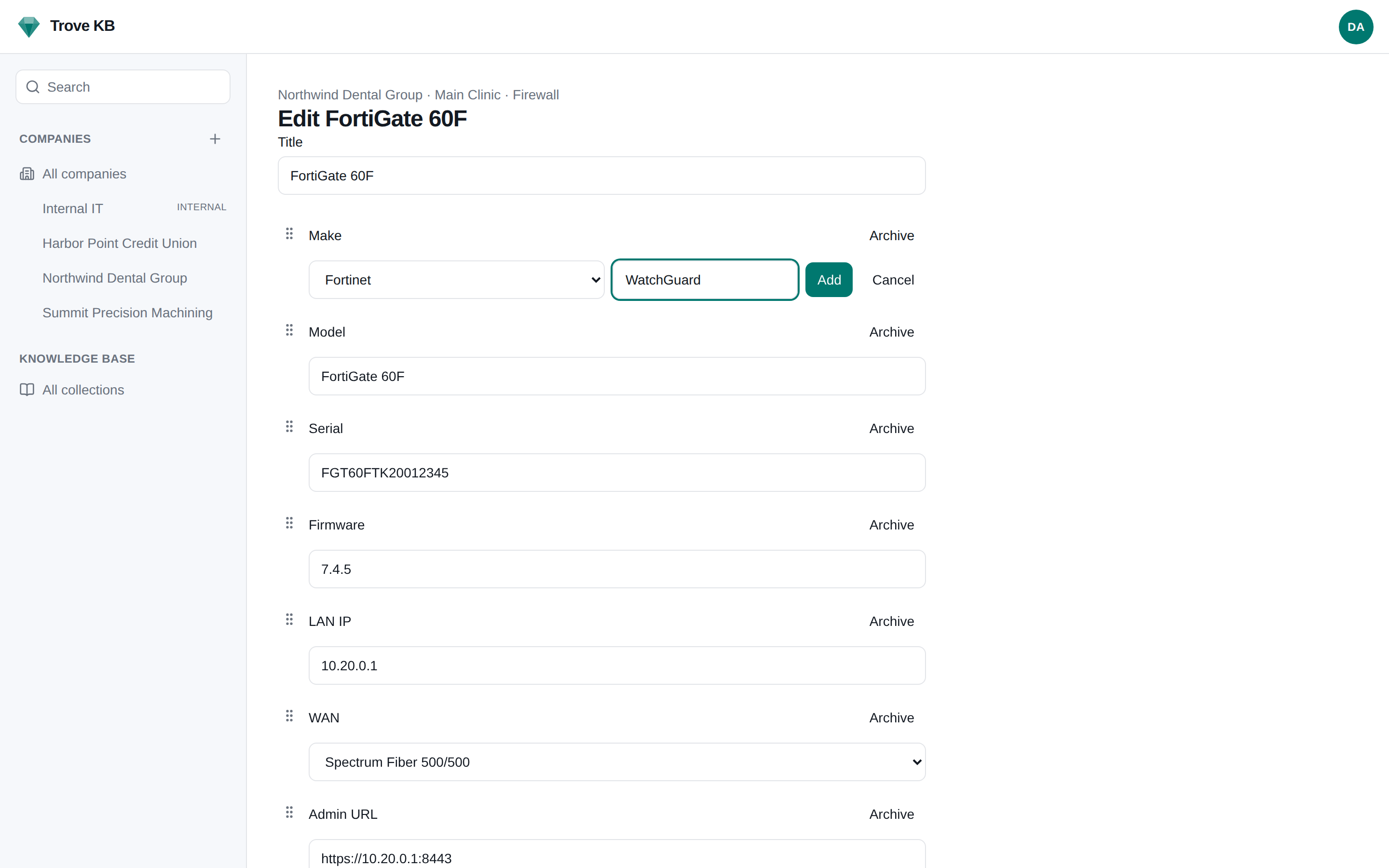
Fields that name something shared across clients, a registrar, an internet provider, a firewall vendor, are dropdowns on an instance-wide list. Fields that name that client's own record, which circuit a firewall sits on, are links to the document. Lists are editable inline with the +, and what you add is there for every company afterwards.
Plain strings. IPs are validated; URLs open in a new tab from view mode.
TipTap editor, stored as markdown source, rendered on read. VLAN tables, backup notes, the long tail.
Stored as HTML, sanitized server-side on every write.
Typed, formatted in the reader's locale, never a free-text date.
Draws from a shared option list. The + beside the select adds an option for every company after.
Points at a document of a named type. Written to document_links, so the target shows backlinks.
A reference into your vault plus cached non-secret metadata. The value is fetched live on reveal.
Never leave the document to fix the template.
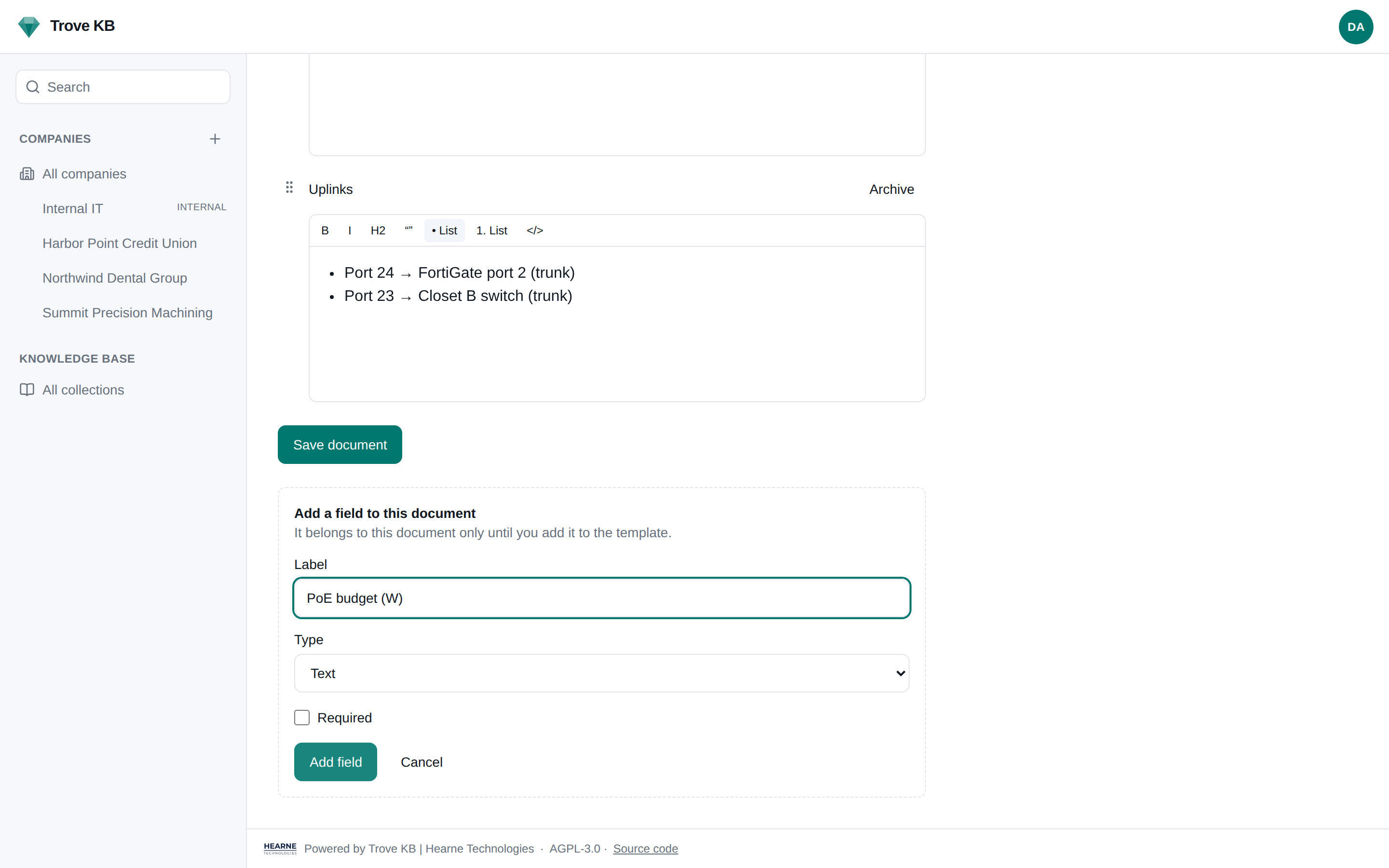
This is the whole point of the project. A tech documenting a switch finds the template has no field for the PoE budget. Adding one is a button in the document, not a trip to admin, and promoting it to the template is the next button.
- 1
Edit mode shows every field of the document: template fields first, then local fields, in the order you set.
- 2
"Add field" in edit mode creates a local field on that document. Nobody has to open admin.
- 3
Each local field has "Add to template". Promoting asks once: confirm the label, type, and option list. One UPDATE; every existing document of that type gets the new empty field.
- 4
Dropdowns show a + next to the select. Adding an option writes to the shared list and selects it.
- 5
A drag handle on every field. Reordering a template field asks: this document only, or update the template.
- 6
Archiving a field hides it everywhere; values stay in JSONB so old revisions still render. Nothing is hard-deleted.
- 7
Every save writes a revision and an audit entry, and queues webhooks.
The ISP knows which firewall sits on it.
A doc_link field points at a document of a named type. The firewall's WAN links to the ISP document; the printer's supplies vendor links to the Vendor document. Every link is written to a links table, so the target shows what points at it, and a search for the circuit id finds the firewall too.
Global search is a Postgres tsvector over every document, scoped to the companies the reader may see. No Elasticsearch, no Meilisearch, no second service to back up.
Set SEED_ON_START=true and the first boot loads a pack with the option lists it needs. Edit them, archive them, or start from nothing.
Model text
Serial text
Firmware text
LAN IP ip
WAN doc_link → ISP
Admin URL url
Credentials secret_ref
Notes markdown
Revisions on every save
A revisions page per document. Archived fields keep their values in the JSONB, so a revision from before the archive still renders whole.
Review schedules
A date that arrives once, or a job that comes round, each with a lead time. Marking a recurring job done rolls forward from the date that was due, so lateness never compounds.
Per-company export
JSON and Markdown from the company page or the API, for reading and handover. A client leaving takes their documentation with them, in a form they can read.
Ready to document something?
One compose file, no required services beyond Postgres. Read the docs, or take the next feature for a spin.